A practical, step by step guide for absolute beginners and small sellers. The approach is based on observing real profile behavior that drives conversions, and on using KOLSprite account and video export features to compare profiles, discover effective bio language, and validate landing page choices.
 +
+
Introduction: Treat your profile as a storefront not a bio
Many beginners treat the TikTok profile as a short introduction. On TikTok the profile decides whether curiosity becomes a purchase. A focused bio, a single clear link, and pinned videos that answer buyers questions will increase clicks and conversions.
The goal is to reduce friction between watching a video and taking the next step.
Section 1 Profile essentials, simple and practical
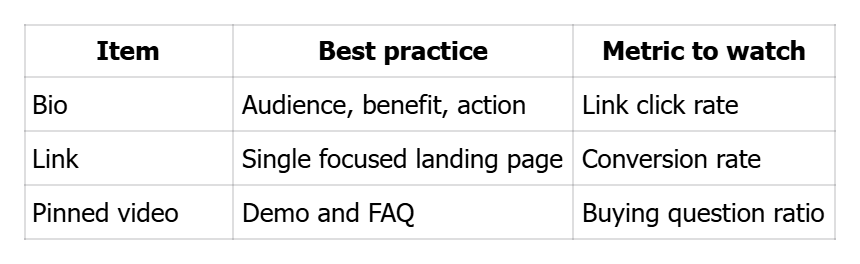
Bio, link in bio, and pinned videos are the three most important profile elements.
- Bio: one line that answers who you help, the benefit, and the next step. Keep it concise and specific.
- Link in bio: point to a single high intent page, not a list of unrelated pages.
- Pinned videos: pin the demo and the FAQ so a new visitor sees product use and practical details immediately.
Use KOLSprite to export competitor profiles and see which bio formats appear repeatedly in your category. That helps you avoid guessing.
Section 2 How to write a converting bio, templates you can copy and test
A converting bio contains three parts: audience, benefit, action. Examples you can adapt:
- For a gadget: Save 10 minutes daily with this handheld blender, check link in bio
- For a beauty product: Glow in 7 days, vegan formula, check link in bio for sample
Test three variants over a week and measure link clicks. KOLSprite can export the bios of top sellers so you can compare language patterns and shorten the testing cycle.
Section 3 Link in bio choices, pick the right landing page
Which landing page should you use:
- Best if you can fulfill quickly: direct product page with price and buy button.
- Next best: single product promotion page with a clear purchase action.
- Avoid pages that require many clicks or show many unrelated items.
KOLSprite can help you see if competitor pages generate buying questions in comments. If many users ask where to buy, the landing page may be unclear. That is a data signal you can act on.
Section 4 Which video to pin and how to use pinned content effectively
Pin the video that answers the most common buyer questions, usually a demo or a clear FAQ. The second pinned video can be a customer reaction or a shipping and returns explanation.
In pinned video captions repeat the action step, for example tell users to check the bio link or to comment for a direct link.
Use KOLSprite to export the pinned videos of competitive accounts and note their order and content. That will reveal proven pinned video strategies in your niche.
Section 5 A 48 hour profile optimization sprint you can run now
Follow this fast loop to see measurable results quickly.
- Use KOLSprite to collect three competitor profile samples and note bio styles and pinned videos.
- Draft three bio versions and choose the single landing page to use in your link in bio.
- Pin a demo video and an FAQ video.
- Monitor profile clicks and comment patterns for 48 hours.
- Update the bio or pinned content based on the most frequent comment or question.
This quick test helps you learn from real user behavior rather than opinion.
Profile quick reference
 +
+
Checklist before publishing profile changes
- Bio has audience, benefit and clear action
- Link in bio points to a single purchase-focused page
- A demo video and an FAQ video are pinned
Competitor profiles exported using KOLSprite for reference
CTA
Optimize your profile with small data driven changes. Compare competitor profiles with KOLSprite, test one change at a time, and turn views into orders.

 Refer & Earn