This article is written for TikTok beginners and small sellers who want to understand why low-quality videos can still go viral. The insights are based on real creator behavior, trend observation, and TikTok background music (BGM) performance data surfaced through KOLSprite’s new Background Music Analytics feature.
 +
+
Introduction: Why “Bad Videos” Sometimes Go Viral
If you’ve spent time on TikTok, you’ve probably seen videos that look poorly edited, low resolution, or creatively average — yet they have hundreds of thousands of views. For beginners, this is confusing and frustrating.
In most cases, the secret is not the video itself.
It’s the background music.
TikTok’s algorithm heavily rewards videos that use rising or peak-stage BGMs. When a sound gains momentum, TikTok pushes all videos using it — even mediocre ones.
Understanding and copying this behavior is one of the fastest shortcuts for beginners.
Section 1: What Role Background Music Plays in TikTok Distribution
Background music on TikTok is not decoration. It is a distribution signal.
When a BGM starts gaining traction:
- TikTok tests it across more users
- Videos using that sound get extra exposure
- Creators benefit even with simple visuals
This is why experienced creators:
- Track BGMs weekly
- Reuse the same sound across multiple videos
- Switch visuals, not music
For beginners, this is good news: you don’t need perfect content — you need the right sound at the right time.
Section 2: Why Many Creators “Copy” BGMs Instead of Inventing Ideas
Creating original concepts every day is exhausting. Successful creators reduce effort by:
- Finding BGMs already proven to work
- Applying them to repeatable formats (demo, before/after, POV)
This creates a content “multiplier effect”:
- Less creative stress
- Higher probability of reach
- Faster testing cycles
With KOLSprite’s TikTok Background Music Page, beginners can now:
- See which BGMs are driving traffic
- Identify which niches they work best in
- Avoid sounds that are already oversaturated
Section 3: How Beginners Can Find the Right BGM (Step-by-Step)
Here’s a simple beginner workflow:
- Open KOLSprite → Background Music Analytics
- Sort BGMs by growth rate, not total usage
- Click into a BGM to see:Video volume trendCreator adoptionContent categories using it
- Check video samples using that sound
If you see:
- Average visuals
- Different creators
- Consistent views
That BGM is worth copying.
Section 4: How to Apply Trending BGM Without Looking Like a Copycat
Copying music ≠ copying content.
Good practice:
- Keep the same BGM
- Change the hook text
- Change product angle or scenario
Example:
- Creator A: “This tool saved me 30 minutes a day”
- You: “Why no one told me this earlier…”
- The music gives you reach.
Your hook gives you differentiation.
Section 5: Common Beginner Mistakes to Avoid
❌ Using BGMs after they peak
❌ Choosing music based on personal taste
❌ Changing music every video without testing
❌ Ignoring niche relevance
Always let data decide, not intuition.
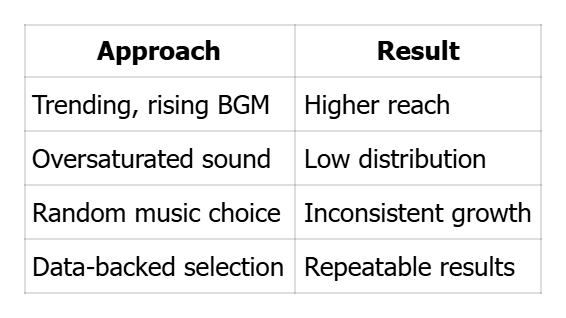
Table: Good vs Bad BGM Selection
 +
+
CTA
Want to stop guessing which sounds to use?
Use KOLSprite’s Background Music Analytics to find trending BGMs early and apply them before the crowd.


 Refer & Earn