 +
+
This guide is for content and ecommerce teams that can see a busy TikTok comment section but still do not know what to change. TikTok comment analysis for ecommerce is useful only when it answers one business question. The finished output here is a comment-to-action report that turns a checked theme into one content, FAQ, or product-page task with an owner and a follow-up measure.
Start with one video and one question. Ask if viewers understand the size, setup, what the product works with, or its main use. KOLSprite's AI Comment Analysis can sort the thread into six report parts. But a theme without an owner is still just a pile of comments. The team checks the source comments and the key video moment before it assigns one change. This stops a fast AI summary from becoming a product call with no proof.
KOLSprite's feature guide shows six report parts. They cover the main point, common topics, pain points, use cases, buying questions, and other products named in the comments. The extension can also export the full comments to Excel or turn the report into a long screenshot for a team review.
That structure is useful because each panel answers a different question. It does not turn every comment into a buyer signal. The team still has to open the source comments behind an important theme and decide which business action, if any, follows.
See the official AI Comment Analysis interface and six-module guide.
Research snapshot. KOLSprite video search; US market; accessed July 22, 2026; one relevant ice-roller video selected from the returned records. MCP supplied video-level fields only. No comment theme or buyer-intent conclusion is presented as observed data because comment text was not returned through the MCP workflow.
Choose one useful question that appears more than once in relevant videos. Keep the buyer's original wording, then decide where the answer belongs. A size question may need a side-by-side demo and exact measurements on the product page. A suitability question may need a clear limit, not a bigger promise.
KOLSprite AI Comment Analysis can group questions, common topics, and likely concerns while you review the TikTok post. The tool makes the first pass faster. Your team still needs to read the key source comments and check the video moment that caused them.
The first pass is fast. Remove obvious spam and unrelated discussion, then sort the remaining comments into questions, objections, use cases, purchase signals, and competitor references. The second pass is slower. Read source comments from each important group and compare them with the exact moment in the video that triggered the response.
This prevents a common mistake. A repeated word does not always point to the same need. Ten people may mention price for different reasons. Some may think the item is expensive, some may be asking where to buy it, and others may be discussing a discount shown in the video. The correct action depends on the surrounding sentence and the offer shown on screen.
End with a short action note: what changed, who owns it, and what evidence would confirm the change helped. That note is more useful than a broad sentiment label because it connects audience language to a specific creative, FAQ, product-page, or offer decision.
Use KOLSprite video search to choose the exact video and preserve its product and creator context before opening the comments. Then use the TikTok UGC strategy guide as the upstream plan for turning repeated buyer questions into a creator brief and a focused content test.
Open a supported TikTok comment area and start KOLSprite AI Comment Analysis. Review the main topics, buyer concerns, use cases, signs of interest, and mentions of other products. Then open a few source comments from every important group.
Give each useful group one owner and one next step. Send product questions to the page owner. Send repeated confusion to the content lead. Send offer questions to the person who owns price, shipping, or stock. Leave a theme out when no one can name the decision it should change.
Ask three questions: Can we point to the original comments? Does the video context support this reading? Can one owner make a clear change this week? A theme that fails any one of these checks stays in the research notes instead of becoming a public claim or a new project.
The KOLSprite extension update log records AI Comment Analysis as an extension feature. Check the live extension before publishing instructions because controls can change.
TikTok's Business Help Center describes six comment-insight views for ads, including trends, sentiment, comparisons, a word cloud, audience data, and the comment table. That is a useful reminder that a summary is only one view of the evidence. Use the KOLSprite report to find the theme, then return to the original comments and video before you change a claim, page, or brief.
A comment responds to a certain creator, price, hook, and moment in a video. Keep that context when you reuse the wording. A price comment under a heavy discount may be about the offer, not the product. A funny comment may look positive but have nothing to do with buying.
Use careful language when you share the result. Do not say "customers demand" a feature because a few comments asked about it. Say that repeated questions showed a missing answer worth testing. This is accurate and still gives the team a clear next step.
Act on topics that can improve the buyer's experience, such as fit, care, compatibility, price, shipping, and stock. Leave general jokes and unrelated talk in the comment section. This simple filter saves time and keeps the team focused.
A good report is short enough to use. It should name the video, the product, the date, and the question the team wanted to answer. It should show the main comment groups and include a few short examples from the source comments.
For each group, add one plain conclusion and one next step. For example, repeated size questions may lead to a new comparison shot and exact size details in the FAQ. A few jokes about color may need no action at all.
Add one note about limits. Say how many comments the team reviewed and whether it checked one video or several. This note gives the reader enough context. The full cleaning process and unused comments can stay in the private research record.
End the report with one owner and one due date. A clear task is more useful than a long list of topics. After the change goes live, check whether the same question appears again.
| Report module | Useful question | Possible owner |
|---|---|---|
| Overall summary | Is the conversation mainly about the product, the creator, or entertainment? | Research lead decides whether deeper review is worth the time. |
| Discussion topics | Which product details or story moments keep returning? | Content lead chooses the next angle to investigate. |
| Pain points and complaints | What friction appears in the product, offer, or explanation? | Product-page or support owner verifies the issue. |
| Use cases and audience | Who imagines using the product, and in what setting? | Positioning owner checks audience fit. |
| Purchase intent | Are people asking where to buy, price, size, stock, or a link? | Commerce owner checks the path from video to offer. |
| Competitors and substitutes | What other products are buyers comparing? | Research lead opens a focused competitor review. |
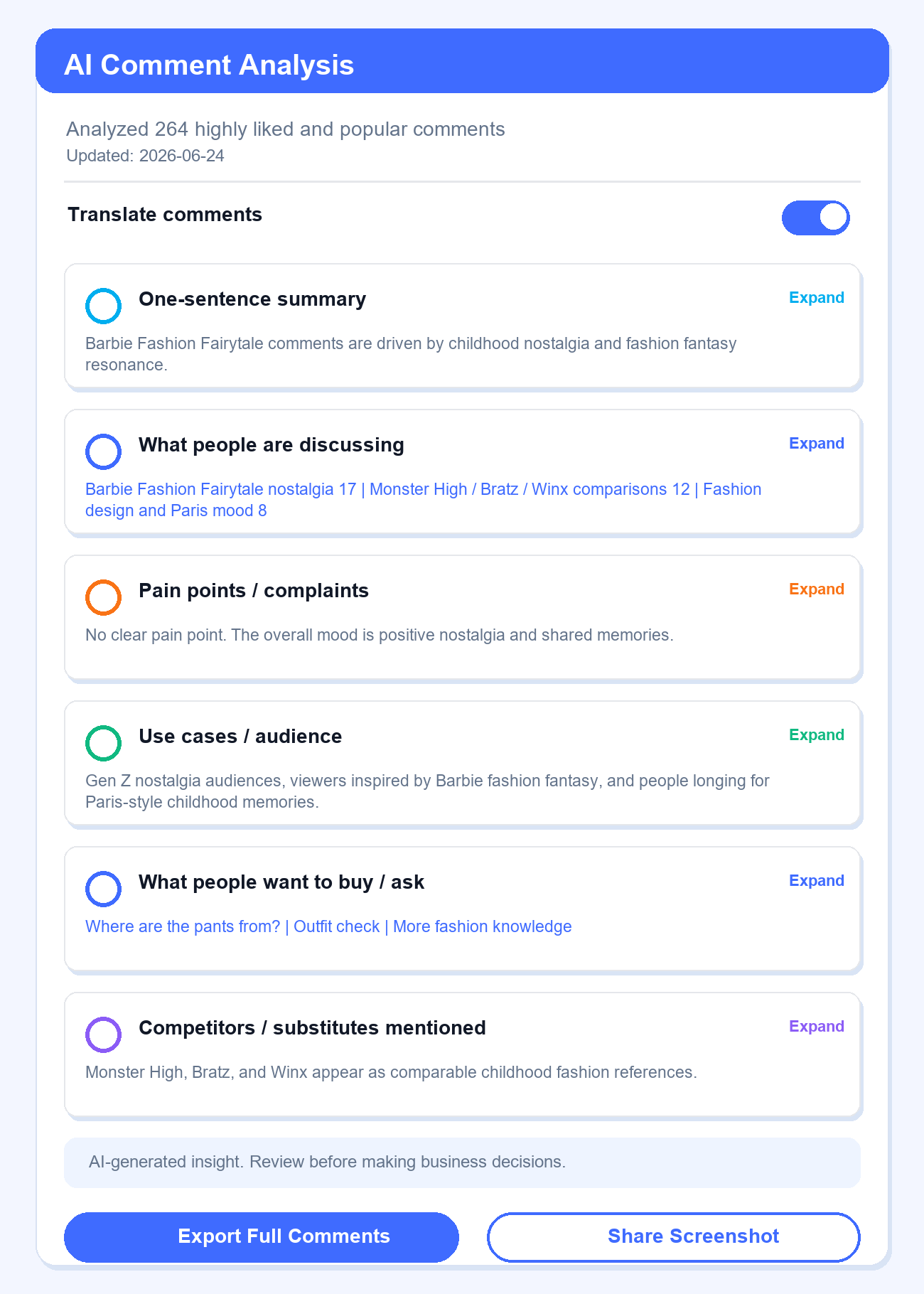
The screen below shows 264 comments sorted into six report parts. It covers the main point, common topics, pain points, use cases, buying questions, and other products. The screen looks rich because it holds a lot of text. Its real value is simple. A reviewer can choose which theme needs a source check and which themes to ignore.
 +
+
Official KOLSprite AI Comment Analysis interface example. The displayed report analyzed 264 comments in the product example shown. Treat it as a feature demonstration, not as evidence for the ice-roller case in this article.
In a live review, keep the report beside the source video. Read a small set of comments from any theme you plan to use. The report speeds up grouping and scanning; the source check protects the team from acting on sarcasm, creator-focused reactions, duplicated questions, or a theme that is real but too small to drive a change.
This is a worked decision example, not a claim about the 577 comments on the ice-roller candidate. Imagine that KOLSprite groups several source comments around freezer fit and product dimensions. The report makes the cluster easy to see; the human check determines whether the comments really refer to size rather than shipping or a joke.
The action report would read like this:
| Observed theme | Several checked comments ask whether the product fits a small freezer compartment. |
|---|---|
| Interpretation | The video creates interest but never gives a size reference. |
| Change | Add a five-second hand-and-freezer comparison to the next creator brief and exact dimensions to the FAQ. |
| Owner | Content lead updates the brief; ecommerce manager updates the page. |
| Follow-up | Review the next video's comments and search queries for the same size question. |
| Limit | The cluster identifies a missing answer. It does not prove that a smaller product would sell. |
This is the point of the feature: it shortens the path from hundreds of scattered reactions to a small set of themes, while keeping the source comments available for the check that matters.
A fast report works only when the source comments are useful. Reject a thread that is mostly jokes, reactions to the creator, copied phrases, or off-topic debate. KOLSprite may still sum up the thread, but that result does not answer a product or content question. The team should record "no product-relevant signal" and move on rather than force an action.
The second case is a theme that disappears when the source comments are opened. Translation, sarcasm, replies, and a discount shown in the video can change the meaning of a phrase. A cluster about "price" might contain bargain questions, complaints, and people asking where to buy. Those are three different decisions. When the checked comments do not support one meaning, the report remains a research lead, not a brief. This safeguard is what makes TikTok comment analysis for ecommerce useful without overstating what the audience said.
The third case is a conclusion that no team can own. "People want better quality" sounds useful, but it does not identify the product detail, video moment, or page answer that should change. A valid action names the evidence, the owner, the change, and the follow-up check. Rejecting a weak summary is part of the workflow because it prevents AI output from becoming a confident-looking task with no clear business value.
The ice-roller example uses a size question. The same flow works for setup, device fit, product life, routine, and delivery questions. For electronics, a cluster about phone models may lead to a list of supported phones. For furniture, questions about assembly may lead to a clearer setup clip. For apparel, repeated fit language may change a size guide or the way a creator shows the garment.
Only the input and owner change. The team still starts with one video and one business question, checks the grouped theme against source comments, assigns one change, and names the measure that will confirm whether the change helped. A creative question may belong to the content lead. A product-detail question may belong to merchandising. A policy question may belong to support or operations.
Do not force every theme into a content idea. Sometimes the best result is a clearer FAQ, a product-page comparison, a support macro, or a decision to leave the message alone. The report is useful when it helps the right person make one better decision, not when it produces the longest list of possible changes.
Create a KOLSprite account and claim a three-day trial membership. Use the trial to inspect TikTok content signals, save useful examples, and plan the next creative test.
Register for a three-day KOLSprite trial
Bring a KOLSprite screenshot or exported theme list to the Discord community. Discuss the meaning and the proposed change, not private user data or an unfiltered comment dump.
 +
+
Discuss a comment-to-action report on Discord
A useful report should reduce the number of decisions, not multiply them. It names the video, shows the relevant theme, preserves checked source comments, assigns one change to one owner, and states what the comments cannot prove. If the report ends with a sentiment label and no decision, the analysis is not finished.
Latest Articles

As an essential, data-driven toolkit for TikTok influencers and marketers, KOLSprite provides powerful features for effortless creator discovery, trending content identification, and actionable real-time insights.
It empowers users to make smarter decisions and significantly boosts their TikTok business.

 Refer & Earn